Event Media Creation Guide

ULMS 25TH ANNUAL BREAKFAST

Content & Pixel Map Guidelines

Seattle Convention Center — Summit, 5th Floor Ballroom November 30 – December 1, 2026 Prepared by AV Factory for Red Element Studios
v1 · NOVEMBER 2026

About This Guide

And why it matters

This event uses two large LED walls flanking the main stage, both showing the same picture: a single 1920 × 1080 program signal from Red Element's playback, scaled up to fill each wall. You build standard HD content — no custom sizes, no special canvas. But the walls aren't quite 16:9, they're enormous, and the back of the room is a long way off, so a few things are worth knowing before you open your project.

This guide covers exactly how your 1080 picture lands on the walls, the safe area to design inside, minimum sizes that read from the back row, and the technical specs for slides, video, and stills. If anything here raises a question, ask early: cbaldini@avfactory.com

Overview & Quick Reference

Everything at a glance
3456 × 1920 STAGE LEFT LED ROE GP2.6 · 18 × 5 TILES · 29'-6⅜" × 16'-4⅞" 1920 × 1080 IN · FILL WIDTH 3456 × 1920 STAGE RIGHT LED ROE GP2.6 · 18 × 5 TILES · 29'-6⅜" × 16'-4⅞" 1920 × 1080 IN · FILL WIDTH ONE 1920 × 1080 SIGNAL · MIRRORED TO BOTH WALLS MAIN STAGE 36' × 24' × 32" MASKING DRAPE — NO CONTENT ULMS 25TH ANNUAL BREAKFAST — SET OVERVIEW LED WALLS · ISOMETRIC VIEW · NOT TO SCALE · SEATTLE CONVENTION CENTER SUMMIT · NOV 30 – DEC 1 2026 LED WALL ×2 — 3456 × 1920 each, ~120 ft apart, flanking the stage Your 96 px safe area, as it lands on the wall (fill-width scaling)
Two LED walls, roughly 120 feet apart, flanking the 36' main stage — both fed the same 1920 × 1080 signal. Stylized view — not to scale.
DestinationResolution (W×H)AspectPhysical SizeContent Source
Program Signal — what you build1920 × 108016:9 —Red Element playback (video, slides, stills, graphics)
Stage Left & Stage Right LED Walls (mirrored)3456 × 1920 each9:5 (1.8:1) 29'-6⅜" × 16'-4⅞" eachThe program signal, scaled to fit — see Scaling

The System

Both walls are ROE Visual Graphite GP2.6 LED (2.6 mm pitch), 18 tiles wide by 5 tall. Red Element runs all playback and sends AV Factory one 1920 × 1080p 59.94 program feed; we scale it to the walls and show the same picture on both sides. You don't need to think about the walls' native resolution — build at 1920 × 1080 and we'll do the rest.

Three Rules That Cover 90% of It

  • Build at 1920 × 1080, 59.94 or 29.97 fps — standard HD, nothing custom.
  • Keep text and logos inside the safe area (96 px from every edge).
  • Go bigger and bolder than you would for a TV — every pixel is upscaled 1.8× and the back row is about 140 feet from the nearest wall.

How 1080 Fills the Walls — Read This First

The walls are 9:5, your picture is 16:9

Each wall is 3456 × 1920 pixels — a 9:5 (1.8:1) shape, just a hair wider than 16:9 (1.78:1). Your 1920 × 1080 picture has to be scaled up to fit, and because the shapes don't match exactly, there are two ways to do it. The difference between them is tiny — this isn't a letterbox situation — but it's worth knowing which one you're getting.

FILL WIDTH — RECOMMENDED picture runs edge to edge · a sliver is trimmed top & bottom TRIMMED — off the wall TRIMMED — off the wall TRIMMED — off the wall TRIMMED — off the wall YOUR 1920 × 1080 scaled 1.8× → 3456 × 1944 LED WALL 3456 × 1920 FILL HEIGHT — PILLARBOX nothing trimmed · a thin color bar on each side COLOR BAR COLOR BAR YOUR 1920 × 1080 scaled 1.78× → 3413 × 1920 LED WALL 3456 × 1920 ↑ edge differences exaggerated 6× above so you can see them — true size in the zooms below ↓ TOP-LEFT CORNER · TRUE SIZE · 5× ZOOM 12 px of picture hang off the top — trimmed 12 px of picture hang off the top — trimmed your picture starts right at the wall edge your picture starts right at the wall edge wall edge no LEDs TOP-LEFT CORNER · TRUE SIZE · 5× ZOOM 21 px bar ← your picture starts 21 px in (≈2.2" on the wall) ← your picture starts 21 px in (≈2.2" on the wall) wall edge no LEDs
Top: the whole wall in each mode, with the edge differences exaggerated 6× so you can see them. Bottom: the top-left corner at true size, magnified 5×. In reality the difference is well under 1% of the wall — from the audience you'd be hard-pressed to spot it.
Fill Width recommendedFill Height (pillarbox)
Scale factor1.8×1.78×
Your picture on the wall3456 × 1944 (overhangs the wall)≈3413 × 1920, centered
What's lost12 wall px top & bottom = ≈7 px of your 1080 source per edgeNothing
What's addedNothing — picture runs edge to edgeA 21 px color bar left & right (≈2.2" / 56 mm each)
Your 96 px safe area lands at173 px in / 161 px down on the wall192 px in / 171 px down on the wall
Our recommendation: fill width. You lose about 7 source pixels top and bottom — well outside the safe area, where nothing important lives anyway — and the picture runs clean to the edges of both walls. Fill height keeps every pixel but frames each wall with two 2-inch slivers of color, which tends to read as a mistake rather than a design choice.
Either way, your content doesn't change. Design at 1920 × 1080, keep critical content inside the 96 px safe area, and the picture works in both modes — the choice is a look, not a redesign. If you'd prefer fill height, tell us by Monday, November 23, 2026 along with the bar color (a hex value); without a color we'll run black bars.

Pixel Maps

One raster to build to — two to show where it lands

Actual-Size Templates

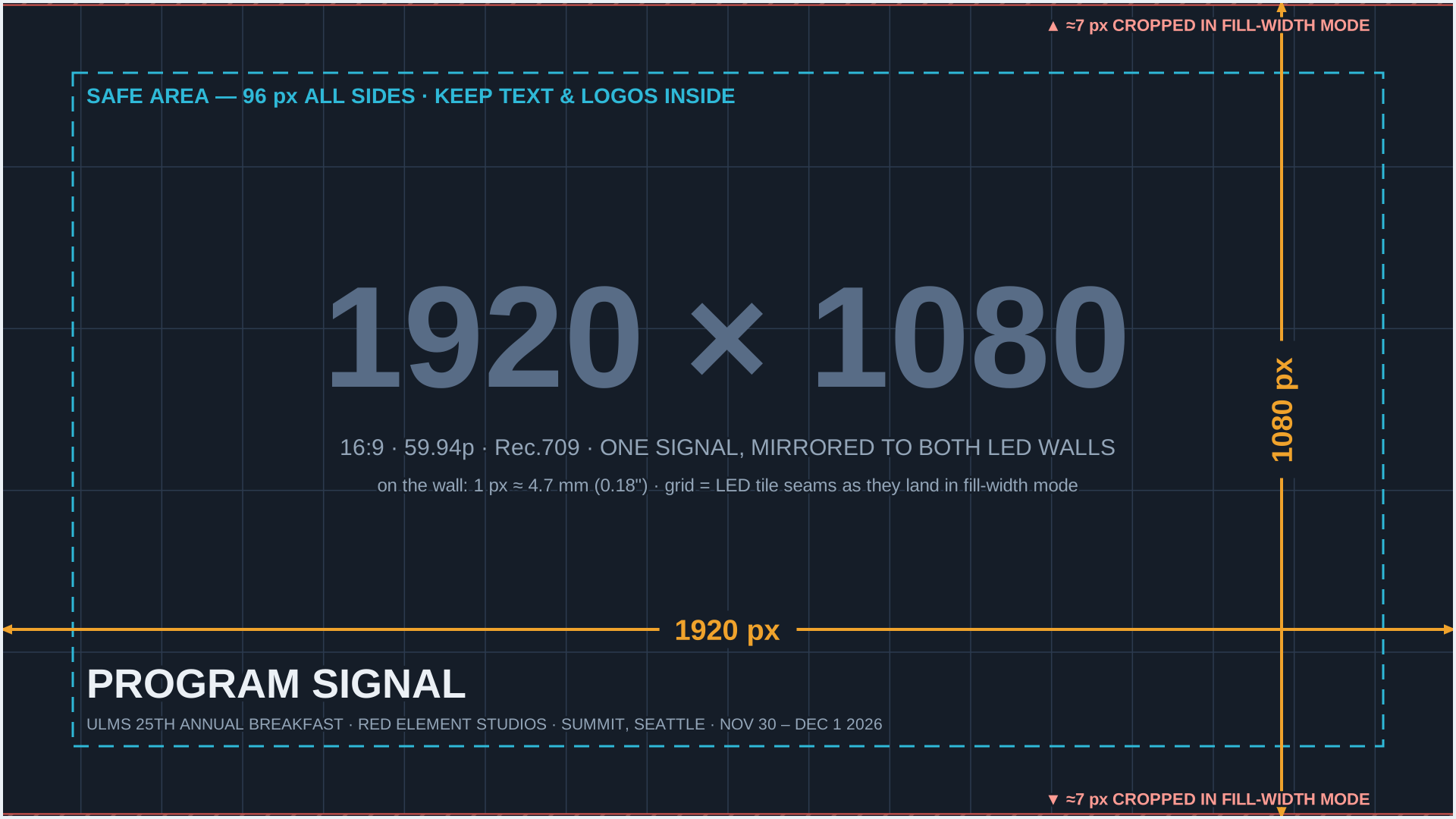
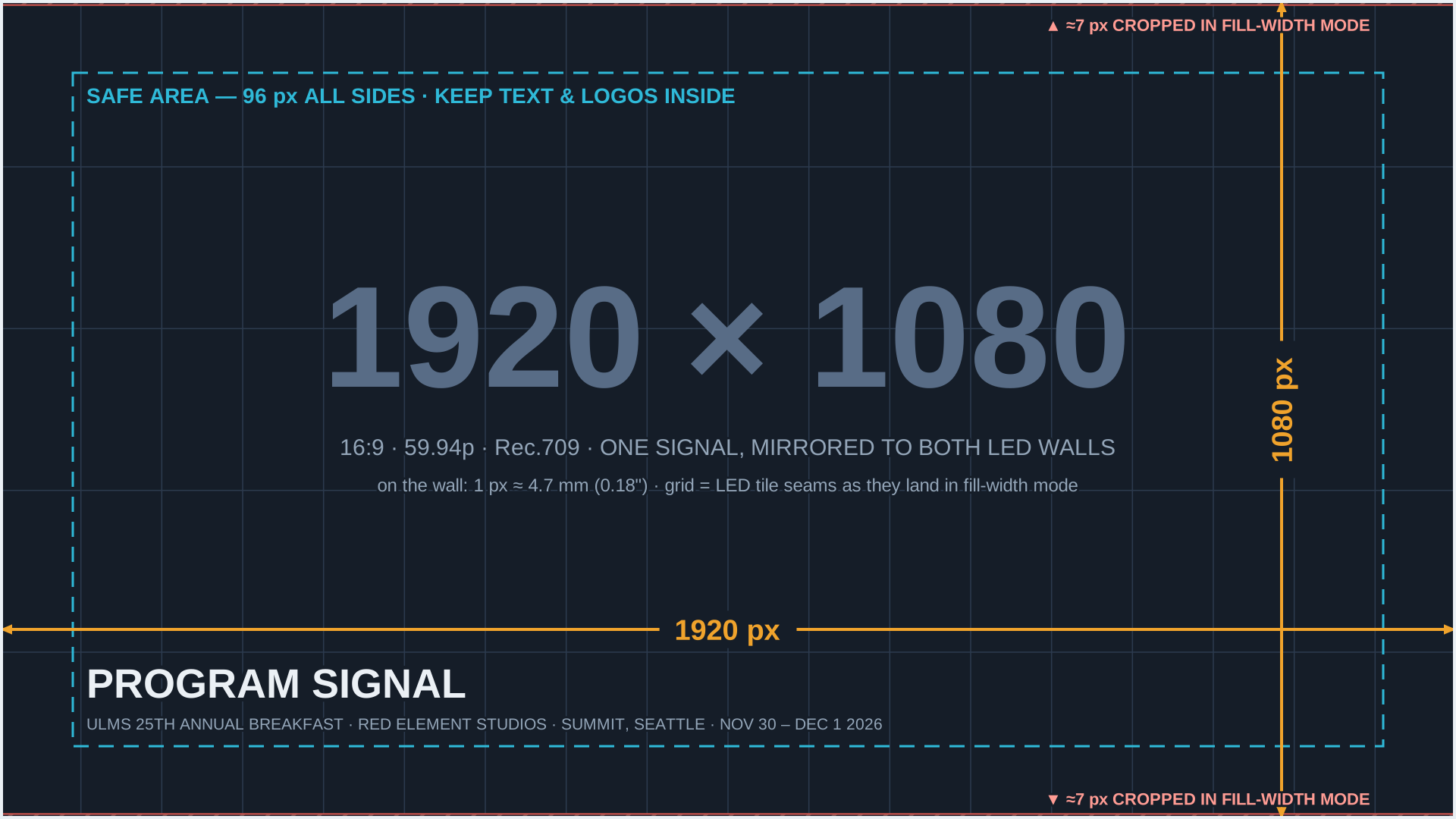
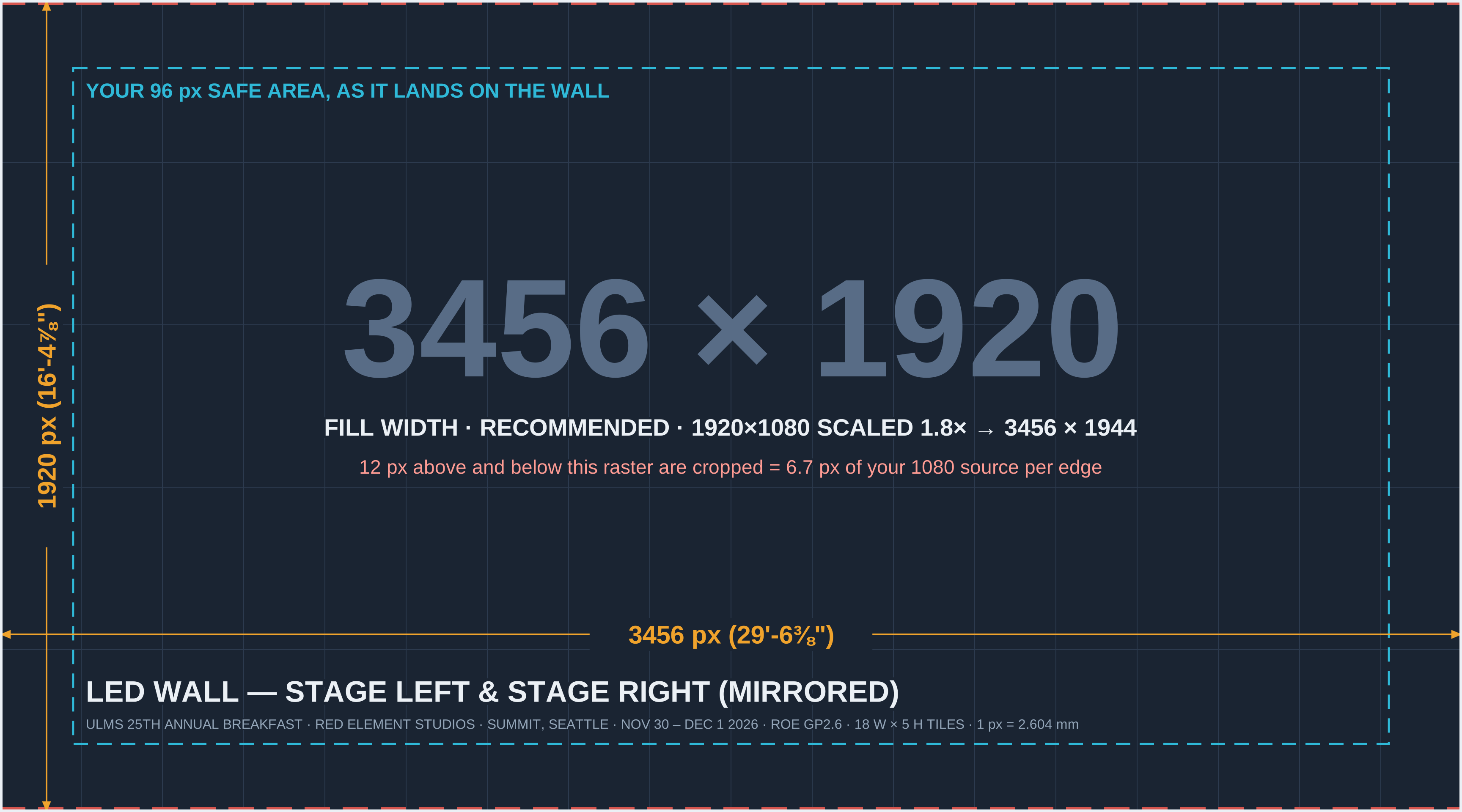
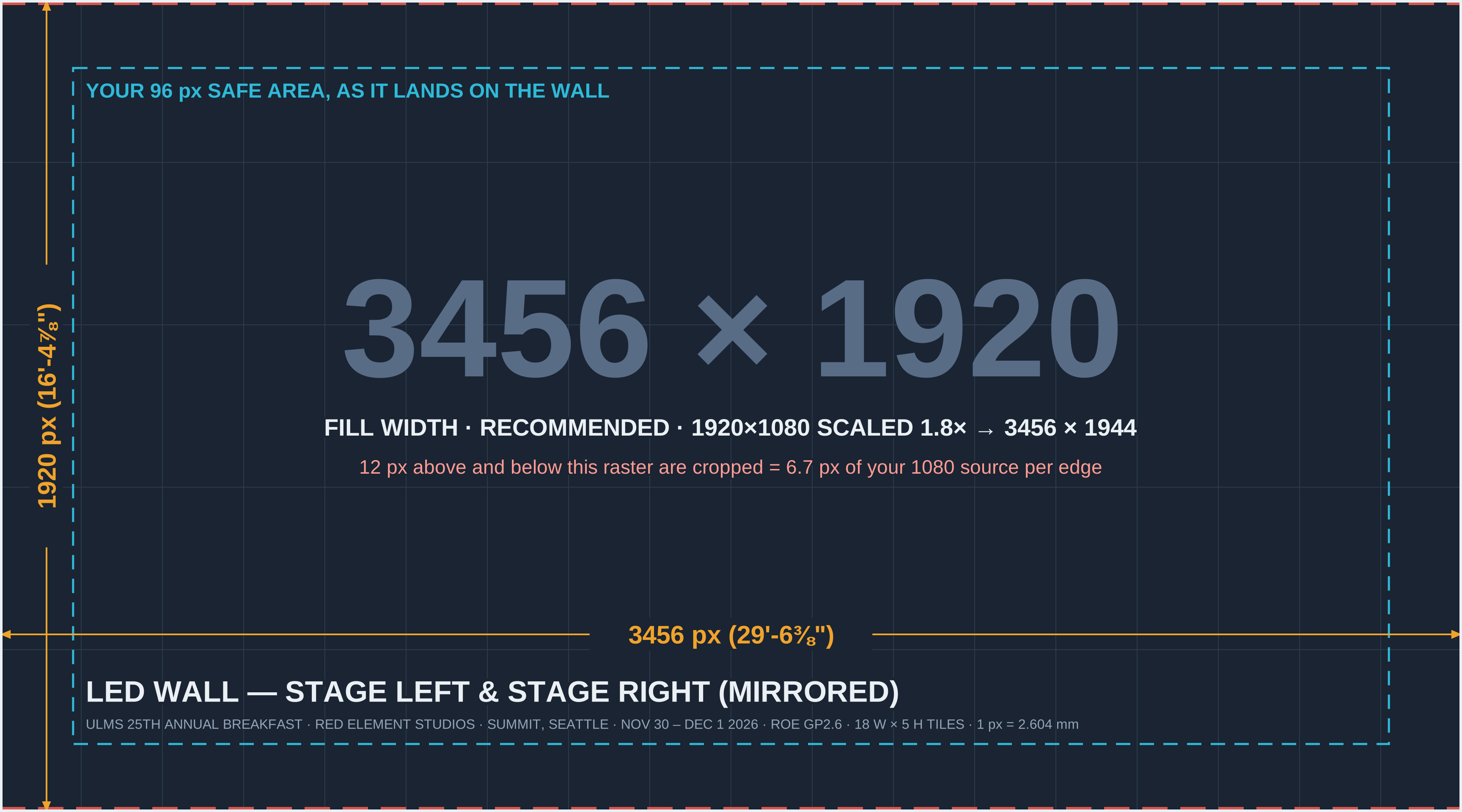
Each map is available as a full-resolution PNG (drop it into your project as an underlay) or as an editable vector SVG. The program-signal map is the one you build to; the wall maps are reference for how it lands.

  • Program Signal — 1920 × 1080 (build to this)  PNG · SVG
  • LED Wall, Fill Width (recommended) — 3456 × 1920  PNG · SVG
  • LED Wall, Fill Height (pillarbox) — 3456 × 1920  PNG · SVG

⬇  Download all maps (PNG + SVG, .zip)

Program Signal — 1920 × 1080 (build to this)

SAFE AREA — 96 px ALL SIDES · KEEP TEXT & LOGOS INSIDE 1920 × 1080 16:9 · 59.94p · Rec.709 · ONE SIGNAL, MIRRORED TO BOTH LED WALLS 16:9 · 59.94p · Rec.709 · ONE SIGNAL, MIRRORED TO BOTH LED WALLS PROGRAM SIGNAL PROGRAM SIGNAL 1920 px 1080 px ▲ ≈7 px CROPPED IN FILL-WIDTH MODE ▲ ≈7 px CROPPED IN FILL-WIDTH MODE ▼ ≈7 px CROPPED IN FILL-WIDTH MODE ▼ ≈7 px CROPPED IN FILL-WIDTH MODE
The faint grid shows where the LED tile seams fall on your picture in fill-width mode (each tile ≈ 107 × 213 source px). The hatched hairlines at the very top and bottom are the ≈7 px that fill-width scaling trims.

On the Wall — Fill Width (recommended), 3456 × 1920

YOUR 96 px SAFE AREA, AS IT LANDS ON THE WALL 3456 × 1920 FILL WIDTH · RECOMMENDED · 1920×1080 SCALED 1.8× → 3456 × 1944 FILL WIDTH · RECOMMENDED · 1920×1080 SCALED 1.8× → 3456 × 1944 12 px above and below this raster are cropped = 6.7 px of your 1080 source per edge 12 px above and below this raster are cropped = 6.7 px of your 1080 source per edge 3456 px (29'-6⅜") 1920 px (16'-4⅞")
Your 1080 picture scaled 1.8×: edge to edge, 12 wall pixels trimmed top and bottom. The dashed cyan line is your 96 px safe area as it lands on the wall.

On the Wall — Fill Height (pillarbox), 3456 × 1920

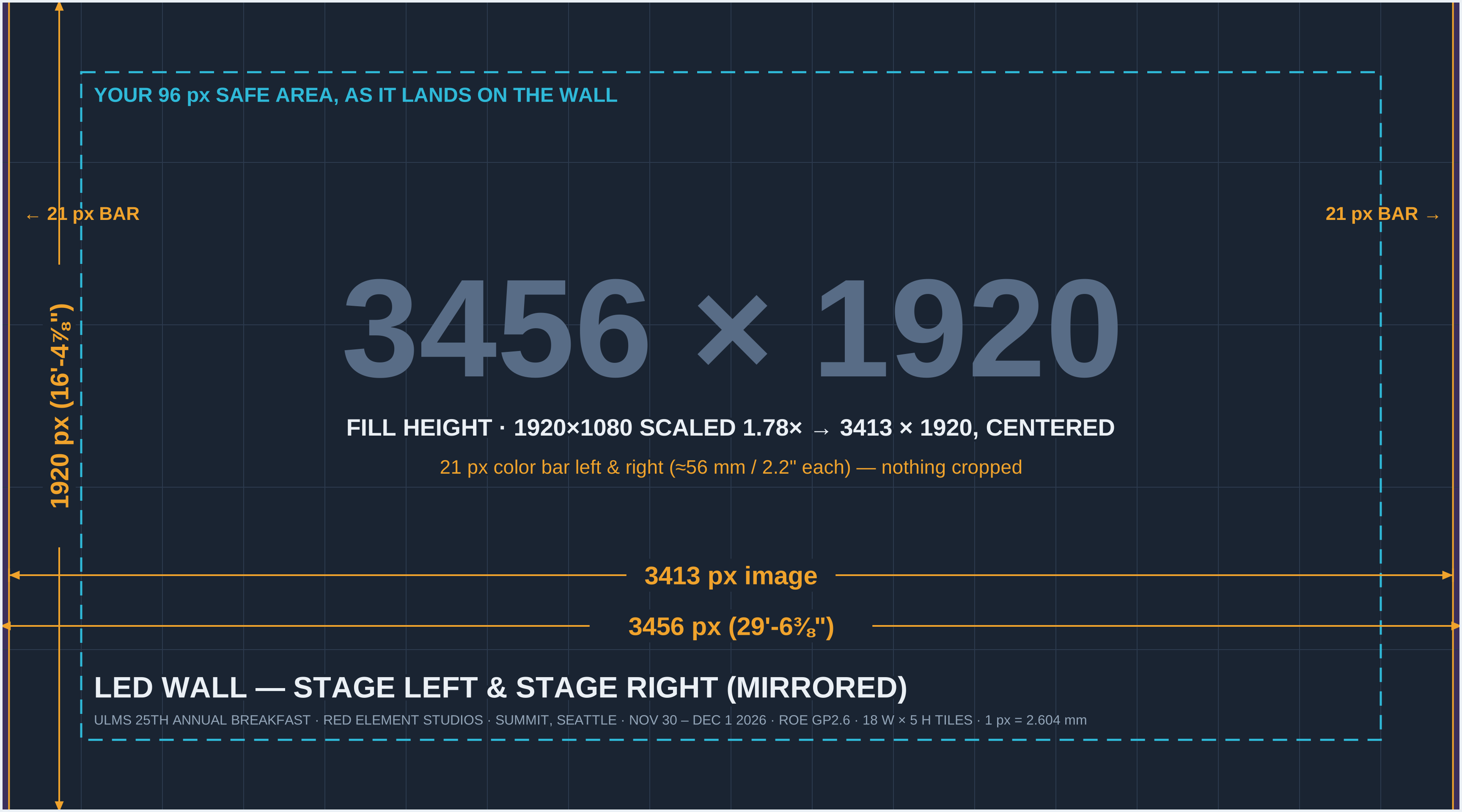
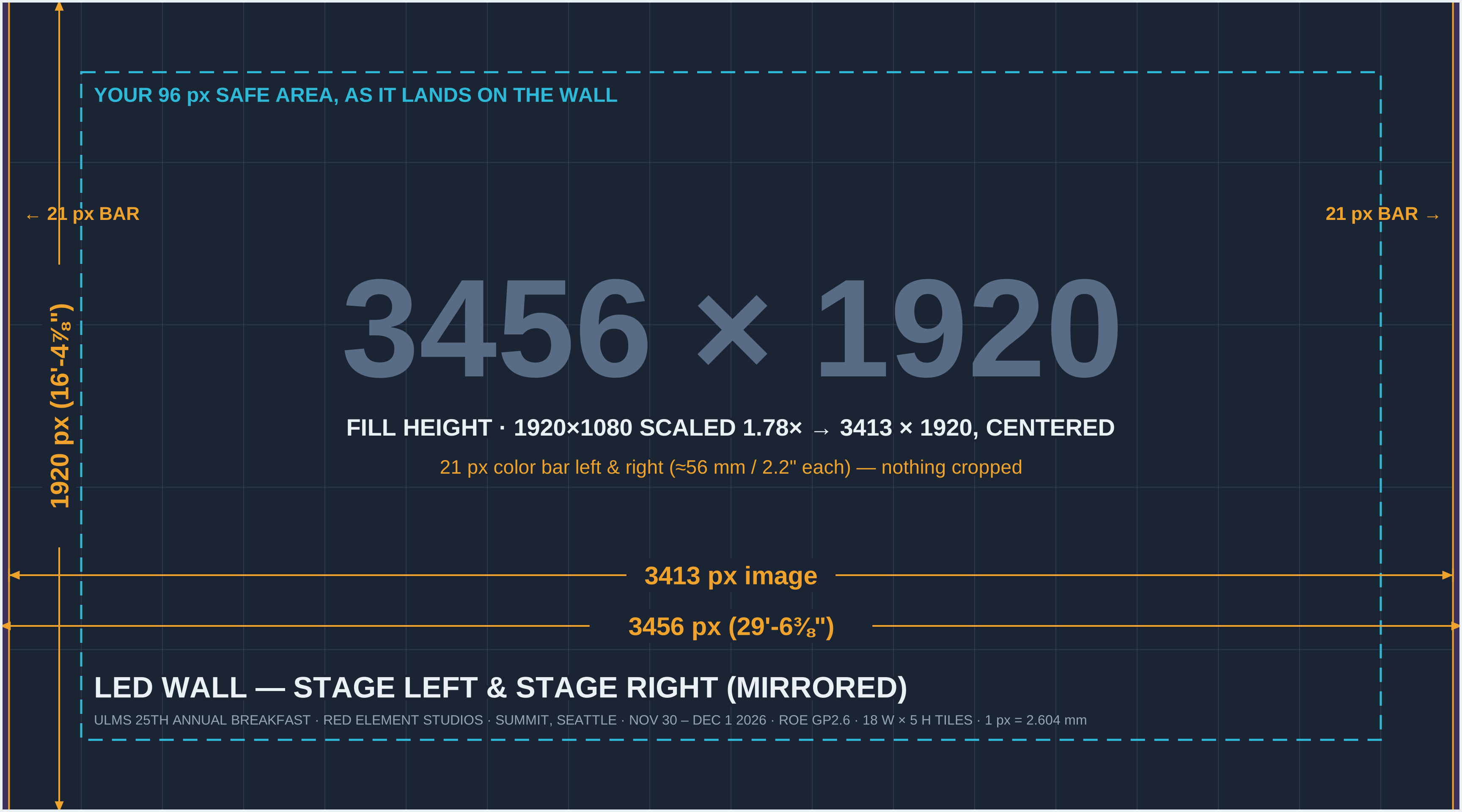
YOUR 96 px SAFE AREA, AS IT LANDS ON THE WALL 3456 × 1920 FILL HEIGHT · 1920×1080 SCALED 1.78× → 3413 × 1920, CENTERED FILL HEIGHT · 1920×1080 SCALED 1.78× → 3413 × 1920, CENTERED 21 px color bar left & right (≈56 mm / 2.2" each) — nothing cropped 21 px color bar left & right (≈56 mm / 2.2" each) — nothing cropped ← 21 px BAR ← 21 px BAR 21 px BAR → 21 px BAR → 3413 px image 3456 px (29'-6⅜") 1920 px (16'-4⅞")
Your 1080 picture scaled 1.78× and centered: nothing trimmed, 21 px color bars at each side.

Big-Room Rules — Read This Too

Upscaled, and a long way from the back row

Two things work against fine detail here. First, every pixel you make becomes about 1.8 × 1.8 LED pixels — roughly 4.7 mm (0.18") square on the wall — and scaling softens hard edges. Second, this is a 2,560-seat room: the back tables sit about 140 feet from the nearest wall. Content that looks crisp on your laptop can turn to mush at that distance. Content designed big, bold, and high-contrast looks fantastic.

WORKS BEAUTIFULLY
  • Large headlines and short phrases — think billboard, not brochure
  • Bold sans-serif type with generous letter spacing
  • High contrast: light text on dark backgrounds
  • Full-frame photography and video
  • Big, simple logos and graphic shapes
  • Slow, smooth motion
WILL NOT READ
  • Paragraphs, long bullet lists, fine print, footnotes
  • 1–2 px lines, hairline rules, thin script fonts
  • Fine patterns, small checkerboards, halftones (they shimmer when scaled)
  • Detailed charts and tables with small labels
  • Anything critical in the outer 96 px
  • Pure full-white backgrounds (blinding in a dim room, and they glare on camera)

Minimum Sizes (in your 1920 × 1080 file)

ElementMinimumRecommendedReal-world size on the wall
Text cap height34 px50 px +≈6" / ≈9"+ tall letters
Slide text (PowerPoint)24 pt36 pt +24 pt reads to about mid-room; 36 pt+ reaches the back
Line / stroke weight3 px4 px +≈½" / ¾"+ thick
Logo width300 px400 px +≈4.6' / 6'+ wide

Sizes are based on the common rule of thumb of about 1 inch of letter height per 15 feet of viewing distance. More is always better in a room this size.

Color and brightness: the walls are bright and saturated. Very saturated reds and pure whites can bloom on LED and on the room cameras. Rich, slightly-off-pure colors (and dark or mid-tone backgrounds) look better in person and on camera. If you're unsure, send us a still and we'll look at it on a wall.

PowerPoint / Slide Decks

Standard 16:9 — nothing custom

Slides come through the same 1920 × 1080 program signal as everything else, so decks use PowerPoint's default Widescreen (16:9) size — 13.333" × 7.5". No custom slide size, no special template. Red Element's playback team runs the decks.

Slide sizeWidescreen 16:9 (13.333" × 7.5") — Design → Slide Size → Widescreen. Not 4:3 — a 4:3 deck shows up with wide black bars on both sides of the wall.
Safe marginKeep text, logos, and charts at least 0.67" from every slide edge (= 96 px). Backgrounds still run full bleed.
Minimum text size24 pt absolute floor; 36 pt+ for anything the whole room needs to read (see Big-Room Rules).
FontsEmbed fonts (File → Options → Save → Embed fonts in the file), and send any non-standard fonts along with the deck to avoid substitution surprises.
Embedded mediaEmbed all video/audio in the deck and provide each media file separately. Avoid linked or streaming media (YouTube, Stream, etc.) — show networks are not the place to find out the venue Wi-Fi is down.
Builds & transitionsSimple builds and fades are fine. Skip flashy transitions ("vortex," "shred") — on a 30-foot wall they're a lot.
BackgroundsDark or mid-tone backgrounds with light text read best on LED; full-white slides are glaring in a dimmed ballroom.

Full Motion Video

Played back by Red Element at 1920 × 1080

Video Export Settings

Resolution1920 × 1080 (16:9), square pixels
Frame rate59.94 or 29.97 progressive — do NOT render 23.98/24 fps or interlaced
CodecPer Red Element
Please avoidLow-bitrate H.264/H.265 web exports for show playback (fine for review cuts)
ColorRec.709, video levels; 8- or 10-bit
AudioEmbedded stereo, 48 kHz · 24-bit (see Audio)
EndingsFade to black or hold a clean end frame — no hard cut to a frozen mid-motion frame

Setting Up Your Edit

Premiere Pro: File → New → Sequence → Settings tab: Editing Mode Custom, Frame Size 1920 × 1080, Timebase 59.94 (or 29.97), Square Pixels, Progressive. Adobe: sequence settings

DaVinci Resolve: File → Project Settings → Master Settings: Timeline Resolution 1920 × 1080 HD, Timeline Frame Rate 59.94 (or 29.97). Set it before you import — the frame rate locks once media is on the timeline. Blackmagic: Resolve manual

Final Cut Pro: File → New → Project → Use Custom Settings: Format 1080p HD, Resolution 1920 × 1080, Rate 59.94p (or 29.97p). Apple: project settings

After Effects: Composition Settings → 1920 × 1080, Square Pixels, 59.94 fps. Render with the codec Red Element specifies and you're set.

Why the frame-rate rule? The whole video system runs at 59.94. A 23.98/24 fps file has to be pulled up at playback, which shows as a rhythmic stutter on every camera move — and on a 30-foot wall, everyone sees it.

Audio

What to send, and in what format
Audio with videoKeep it embedded in the video file — separate "sync to picture" audio files are a rehearsal-day time sink.
Format48 kHz · 24-bit · stereo (WAV for stand-alone cues)
LevelsMix peaking around −6 dBFS with consistent loudness across pieces — no limiter slam. A video that's 10 dB hotter than the one before it is a scramble at FOH.
Silent videosStrip the audio track entirely rather than including silence.
Stingers & musicCoordinate walk-in music, stingers, and award hits with Red Element's playback team — they're rolling it.

Still Images & Event Logos

Technical specifications

Full-Screen Stills

Resolution1920 × 1080
Format.png (preferred) or .tiff — no JPEG for show graphics
ColorsRGB / Rec.709, 8-bit+, no embedded printer (CMYK) profiles
Safe area96 px from every edge

Logos & Graphic Elements

Vector (preferred).svg, .ai, or .eps
Raster.png with transparency, largest size available
Brand kitSend your brand guide (colors, clear-space, don'ts) so anything built on site stays on-brand
Why we push for vectors: a vector logo scales to a 30-foot wall without going soft. If a graphic has to be rebuilt at 6 a.m. before a breakfast doors-open, a vector file is the difference between "done in five minutes" and a phone call nobody wants. We never distribute client content outside this event.

File Naming, Versions & Delivery

Small habits, big time savings
Naming pattern ULMS25_[Content]_v[#].[ext]
e.g. ULMS25_Opener_v2.mov · ULMS25_Keynote_v3.pptx · ULMS25_SponsorLoop_v1.mov
Destination tags None needed — there's one destination. Both walls always show the same 1920 × 1080 picture.
VersioningIncrement v1 → v2 → v3 with every change. Please never use "FINAL", "FINAL2", or "FINALfinal" — we've all been there, and it never ends well.
Show filesDeliver all show content to Red Element's playback team on their schedule — they're running it.
Previews & questions for AVFWant to see something on the walls before show day, or prefer fill-height scaling? Send stills, short test clips, or your decision to cbaldini@avfactory.com via WeTransfer by Monday, November 23, 2026 (one week before the event). No email attachments over 20 MB, please.

Frequently Asked Questions

You can always ask more — we like questions
Do I need to make anything at a special size?
No. Everything is 1920 × 1080 (16:9). The walls' native 3456 × 1920 resolution is our problem, not yours — we scale your signal to fit.
Will my 1080 content look soft on walls this big?
A little, up close — it's being scaled 1.8×. From the audience it looks great, if the content was designed for it: big type, solid strokes, high contrast. Fine detail is what suffers, which is why the Big-Room Rules exist.
Fill width or fill height — which should we pick?
We recommend fill width: the picture runs edge to edge and you lose about 7 pixels top and bottom that were never in the safe area anyway. Fill height keeps every pixel but adds two ~2-inch color bars to each wall. Your content works either way.
Can the two walls show different things?
Not for this event — both walls are fed the same program signal and always mirror each other. Design one picture.
Why not 24 fps? It's cinematic!
The system runs at 59.94 Hz. A 23.98/24 fps file gets pulled up at playback, which shows up as stutter on camera moves — painfully visible on a 30-foot wall. Shoot however you like; render at 29.97 or 59.94.
What about old 4:3 slides or video?
They'll display, centered, with wide black bars on both sides of each wall. Fine in a pinch; not what you want for anything that matters. Rebuild in 16:9 if you can.
Can I submit other codecs or formats?
Check with Red Element's playback team first — it's their system. If it's a question about how something will look on the walls, ask us: cbaldini@avfactory.com.